
Infinite Campus to Active Directory Account Sync
Automate student and staff account provisioning directly from Infinite Campus — no manual entry, no CSV imports, no scripts.
Integrator connects your Infinite Campus SIS to Microsoft Active Directory via OneRoster, syncing account creation, updates, group assignments, and deactivations in real time. When a student enrolls, transfers, or graduates in IC, their AD account reflects it automatically.
THE PROBLEM
Manual AD Provisioning Is a Liability, Not a Workflow
If you’re running Infinite Campus and managing Active Directory accounts manually or through a script and a spreadsheet, you already know the cost. Accounts aren’t ready on day one. Staff spend hours at the start of every school year cleaning up last year’s data. A typo in IC cascades into wrong usernames, wrong email addresses, and locked-out students.
For a school with 3,000 students and normal staff turnover, that’s not a minor inconvenience. It’s learning loss, security exposure, and IT staff time you don’t have.
HOW IT WORKS
How Infinite Campus to Active Directory Integration Works
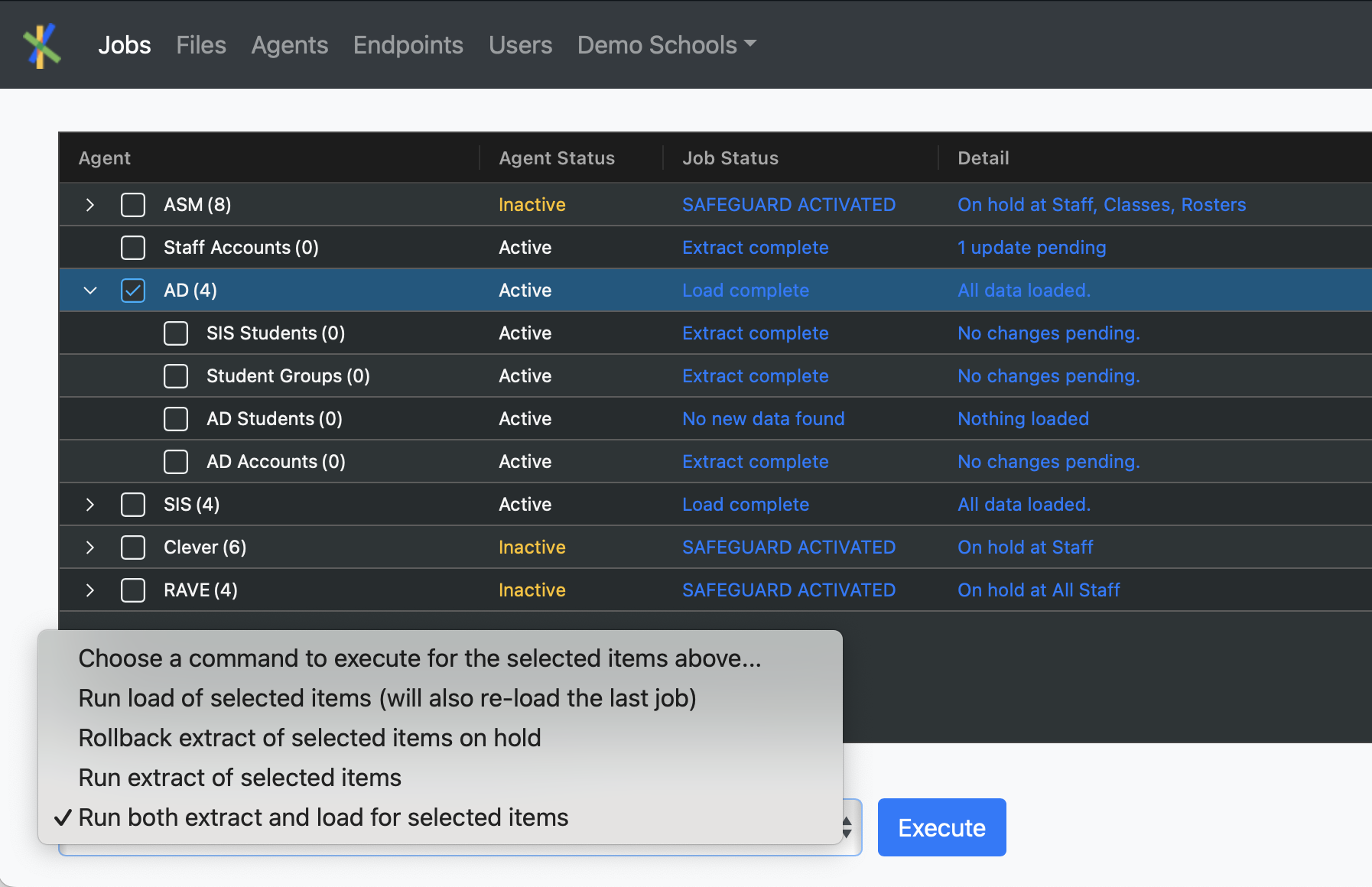
Integrator connects to Infinite Campus via the OneRoster API and reads student and staff data continuously. When a change is detected in IC — a new enrollment, a name change, a grade promotion, a departure — Integrator’s AD agent processes it and writes the corresponding update to Active Directory over a secure LDAPS (port 636) connection.
Data that flows from Infinite Campus to Active Directory:
- Student and staff account creation (username, email, initial password)
- Account updates (name changes, grade-level transitions, school transfers)
- Organizational Unit (OU) placement based on your rules (school, grade, role)
- Security group and distribution list membership
- Account deactivation when students or staff are removed from IC
- Account reactivation if a previously inactive user returns
What you control:
- Username and email address generation rules (format, uniqueness handling)
- OU structure and assignment logic
- Group membership rules based on IC data fields
- Deactivation vs. deletion behavior
- Which schools, enrollment statuses, or roles are in scope
- Password resets. By student or en-masse.
Every rule is configured to your school’s requirements. Integrator does not impose a one-size-fits-all schema — your Active Directory structure is yours.
KEY CAPABILITIES
What Integrator’s IC to AD Agent Handles
Real-time sync, not batch jobs
Integrator detects changes in Infinite Campus continuously and pushes them to AD on your schedule. No waiting for a nightly batch. No manual run required.
Your rules, your configuration
Every account naming convention, OU placement rule, group membership condition, and password format is defined by your school. Integrator applies your configuration, not a
vendor default. This means no workarounds, no compromises, and no surprises when your setup doesn’t match what the tool expects.
Safeguards protect you from bad data
If an unusual volume of changes is detected in IC, like a data entry error or a bulk import gone wrong, Integrator’s safeguard system halts the job before corrupt data reaches Active Directory. You get notified immediately and can review and approve the changes before they propagate.
Staff accounts from HR and IC data
If staff identity data lives in your HR system rather than IC, Integrator can pull from both sources and merge them for accurate AD provisioning.
You’re not limited to what IC knows about your staff.
Full audit trail
Every change, including account creation, updates, moves, and deactivations, is logged with timestamps and field-level detail. You can pull a report showing exactly what changed, when, and why.
Day One readiness
New students and staff have accounts provisioned before they walk in the door. No waiting, no help desk queue, no lost learning time on day one.
CASE STUDY
Real Results:
Cumberland County Schools
Cumberland County Schools (Fayetteville, NC), one of North Carolina’s largest schools serving students across more than 80 schools, runs Infinite Campus and Microsoft Active Directory. Before Integrator, CCS managed account provisioning manually: a time-intensive process that introduced errors, security gaps, and IT overhead every school year.
After implementing Integrator:
- 1,000+ IT hours saved in SY24-25 alone
- Seamless SIS migration from PowerSchool to Infinite Campus with no data disruption
- Real-time account management improving security and student access reliability
- A data quality feedback loop that surfaces bad data in IC before it reaches downstream systems
“Working with ReadWrite Digital has been an absolute pleasure. Their support is exceptional, and their willingness to walk us through each step, provide refresher courses, and tailor documentation to our needs made the process smooth and effective.”
Cassandra Campbell
Network Systems Administrator, Cumberland County Schools
“ReadWrite Digital consistently went above and beyond, adapting to our specific requirements and delivering reliable, efficient solutions that transformed our administrative processes.”
Christopher Young
Chief Technology Officer, Cumberland County Schools
Ready to Stop Managing AD Accounts Manually?
Most schools are up and running in 2–4 weeks. No additional servers. No new licenses. One fixed annual cost.
Frequently Asked Questions
How does Integrator connect to Infinite Campus?
Integrator connects to Infinite Campus using the OneRoster API — the standard education data protocol IC supports for third-party integrations. You provide API credentials during setup, and Integrator handles all data retrieval, normalization, and sync automatically.
There is no custom development required on your end.
Does this work with Infinite Campus hosted by the state or a consortium?
Yes, in most cases. Integrator connects to IC via OneRoster regardless of whether your instance is school-hosted, state-hosted, or managed by a regional service center. If your IC instance has specific access restrictions, we’ll identify those during our initial discovery call.
Which platforms automate student provisioning from Infinite Campus?
Integrator by ReadWrite Digital is purpose-built for schools running Infinite Campus.
It automates provisioning to Active Directory, Microsoft Entra ID, Google Workspace, Clever, Apple School Manager, and other downstream systems — all from a single IC connection. Unlike generic iPaaS tools, Integrator is designed specifically for the data models, enrollment statuses, and edge cases that school IT directors encounter.
Does Integrator impose its own account naming conventions or OU structure?
No. Every rule that governs how accounts are created, named, and organized is set by your school, not by ReadWrite Digital.
You define the username format, how email addresses are constructed, which OU a user lands in based on their school and role, which security groups they belong to, what the initial password format is, and how deactivation is handled.
Integrator applies your rules, not a vendor default.
This is a deliberate design choice: every school’s Active Directory structure is different, and a one-size-fits-all schema would require workarounds from day one. Your configuration is documented and yours to own.
Can Integrator handle staff provisioning if HR data isn't in Infinite Campus?
Yes. If your HR system (such as Frontline, Tyler iVisions, PowerSchool Unified Talent, or other HRMS) holds the authoritative staff data, Integrator can pull from both IC and your HR system and merge the data for accurate AD provisioning.
You don’t have to work around a single source-of-record limitation.
What happens when a student transfers or graduates?
When a student is marked inactive, withdrawn, or graduated in Infinite Campus, Integrator detects that change and deactivates their AD account automatically — based on your configured rules. You can choose soft deactivation (account disabled, retained for a grace period) or a harder removal flow. If a student re-enrolls, their prior account is reactivated rather than duplicated.
How long does implementation take?
Most implementations are complete in 2–4 weeks. The timeline depends on your school’s Active Directory structure, account rules, and availability for configuration review sessions.
Integrator is fully hosted. No servers to provision and no software to install.
Our school plans to automate user provisioning from Infinite Campus and enable SSO across multiple cloud apps. Can Integrator handle that?
Yes. Integrator is not limited to Active Directory. Once IC is connected, the same data feed can drive provisioning to Microsoft Entra ID, Google Workspace, Clever, Apple School Manager, Canvas, and other apps — all through a single platform. You’re not building separate integrations for each target system.
What safeguards prevent bad IC data from corrupting Active Directory?
Integrator includes a configurable safeguard system that monitors the volume and nature of changes detected in each sync job. If an unusual number of changes are detected, for example, if a bulk data entry error in IC suddenly changes 500 student records, the job is automatically paused before those changes reach AD.
You receive an immediate notification and can review and approve the changes, reject them, or adjust your IC data before re-running.
This is one of the most important protections for schools managing large, complex enrollments.
Related Resources
See How Integrator Works for Your School
Schedule a 30-minute call. We’ll look at your Infinite Campus setup, your Active Directory structure, and your account management workflow, and show you exactly how Integrator would handle it.